


A customer service SOP is the difference between a support team that gives one answer and a team that gives five. In a global survey of 14,300 consumers and business buyers, 79% of customers said they expect consistent interactions across departments, and 56% said they often have to repeat or re-explain information to different representatives. Most of that inconsistency traces back to one gap: nobody wrote the process down.
This guide shows you how to write customer service SOPs from your own ticket history, using the same method our team relies on when onboarding agents for E-Commerce brands. Here is what you will get:
What Is a Customer Service SOP?
A customer service SOP (standard operating procedure) is a written, step-by-step instruction for handling one specific type of customer request. It tells an agent what triggers the procedure, which tools to open, what decisions to make, and when to hand the ticket to someone else.
For an E-Commerce brand, that usually means separate SOPs for order tracking, returns and exchanges, refunds, subscription changes, and damaged deliveries. Each one turns tribal knowledge into a repeatable process that any agent can follow on their first day.
Customer Service SOP vs. Macros vs. Knowledge Base
These three assets get mixed up constantly. That confusion is why many teams think they have SOPs when they only have a folder of saved replies.
| Asset | What It Answers | Who Reads It | Example |
|---|---|---|---|
| SOP | How do I handle this request, step by step? | Agents and team leads | Verify the order date, check the return window, then choose the correct return path |
| Macro | What exactly do I say to the customer? | Agents, sent to customers | A saved reply confirming a return label is on its way |
| Knowledge Base | What is the policy? | Customers and agents | A public return policy page listing eligible items and timelines |
Think of it this way: the SOP is the decision tree, the macro is the script, and the knowledge base is the rulebook. A strong customer support SOP links to the right macros and policy pages, so agents never have to hunt for them.
Why E-Commerce Support Teams Need SOPs
Without documented procedures, the same problems show up in almost every growing support team:
SOPs matter whether you run support in-house, plan to bring on outsourced agents, or both. For E-Commerce support teams, they are the handoff document that lets anyone step into the queue without dropping quality.
Wandering Bear Coffee learned this firsthand. When the cold brew brand pivoted to a direct-to-consumer model with one-time and subscription orders, its support team had no order tracking document, no SOPs, and no reply templates. Every ticket was solved from scratch, so answers depended on whoever picked it up.
Our team built SOPs and templates for the brand's most common requests, including cancel order requests, tracking issues, and product quality issues.
Core Metrics: Average resolution time of 1 hour 14 minutes, a 4.7 CSAT score, a 10.97% CX conversion rate, and $15K+ in revenue generated (June to August 2023).
"It was so nice to have a template of what we can do... I have a cancel order request, tracking issue template, and a quality issue document that our team can share so that we keep track of all these issues."
Amy Darlington, Customer Experience ManagerWhat to Include in a Customer Support SOP
Every customer support SOP should follow the same skeleton, so agents always know where to look. Keep each document focused on a single request type.
How to Write an SOP for Customer Service in 7 Steps
You do not need special software to write your first SOP. You need your ticket history, a spreadsheet, and a few hours with the agents who work the queue every day.
Export Your Ticket History Into a Macro File
Start with what we call a macro file. Think of it as your support team's medical history: a download of past tickets that shows how each issue was actually resolved, which policies applied, and which replies worked.
There are two ways to build and store your macro file, and both work well:
Many teams start with a spreadsheet, then move the finished macro file into a copilot as ticket volume grows. The structure is the same either way, so none of the work is wasted.
Tag and Rank Your Top Ticket Drivers
Group every ticket in your macro file by reason, then count them. In most E-Commerce queues, a handful of request types make up the bulk of the volume.
Choose Your First Five SOPs
Do not try to document everything at once. Write SOPs for your five highest-volume or highest-risk ticket types first, then expand as you go.
Map the Current Workflow With Your Agents
Sit with the agents who handle each ticket type and walk through how they resolve it today. They know the workarounds, the missing steps, and the questions customers really ask.
Write Verb-First Steps With If/Then Decision Points
Write each step as one action that starts with a verb, such as "Open," "Check," "Issue," or "Tag." When a step depends on a condition, spell out both paths.
Attach Macros, Escalation Paths, and SLAs
An SOP tells agents what to do, and the linked macro tells them what to say. Pair every customer-facing step with the saved reply that belongs to it.
Test With a New Agent, Publish, and Set a Review Date
Hand the SOP to someone who has never handled that ticket type and watch them use it. Every question they ask points to a gap in the document.
Free Customer Service SOP Template (Copy and Paste)
Use this SOP template as your starting point. Copy the structure into Google Docs, Notion, or your helpdesk's internal notes, then fill in each field. The third column shows a completed order status SOP, with sample values you should replace with your own policies.
| Section | What to Write | Sample: Order Status (WISMO) |
|---|---|---|
| SOP ID and Title | Short name plus version number | CS-01 Order Status Inquiry, v1.2 |
| Purpose | One-sentence goal | Give customers an accurate delivery update in one reply |
| Scope and Trigger | Ticket types and channels covered | Email, chat, and social tickets tagged "order status" |
| Owner | Person accountable for accuracy | Support Team Lead |
| Tools | Systems agents open | Helpdesk, Shopify admin, carrier tracking page |
| Procedure | Numbered, verb-first steps | 1. Find the order by email or number. 2. Open tracking. 3. Confirm the latest scan and delivery estimate. |
| Decision Points | If/then rules for exceptions | If there is no scan in 5 business days, then open a carrier inquiry |
| Linked Macros | Saved replies to send | "Order Status: In Transit" and "Order Status: Delayed" |
| Escalation | Who, when, and how | Lost orders above your set value go to the Team Lead in the escalations channel |
| Targets | SLA or KPI the SOP supports | First response within your published response window |
| Version History | Date, change, and approver | Added carrier inquiry step, approved by CX Manager |
Below is part of the SOP file our team built for our client JAXXON, covering address changes before and after shipping, address updates without an order number, and subscription cancellations after an order ships.
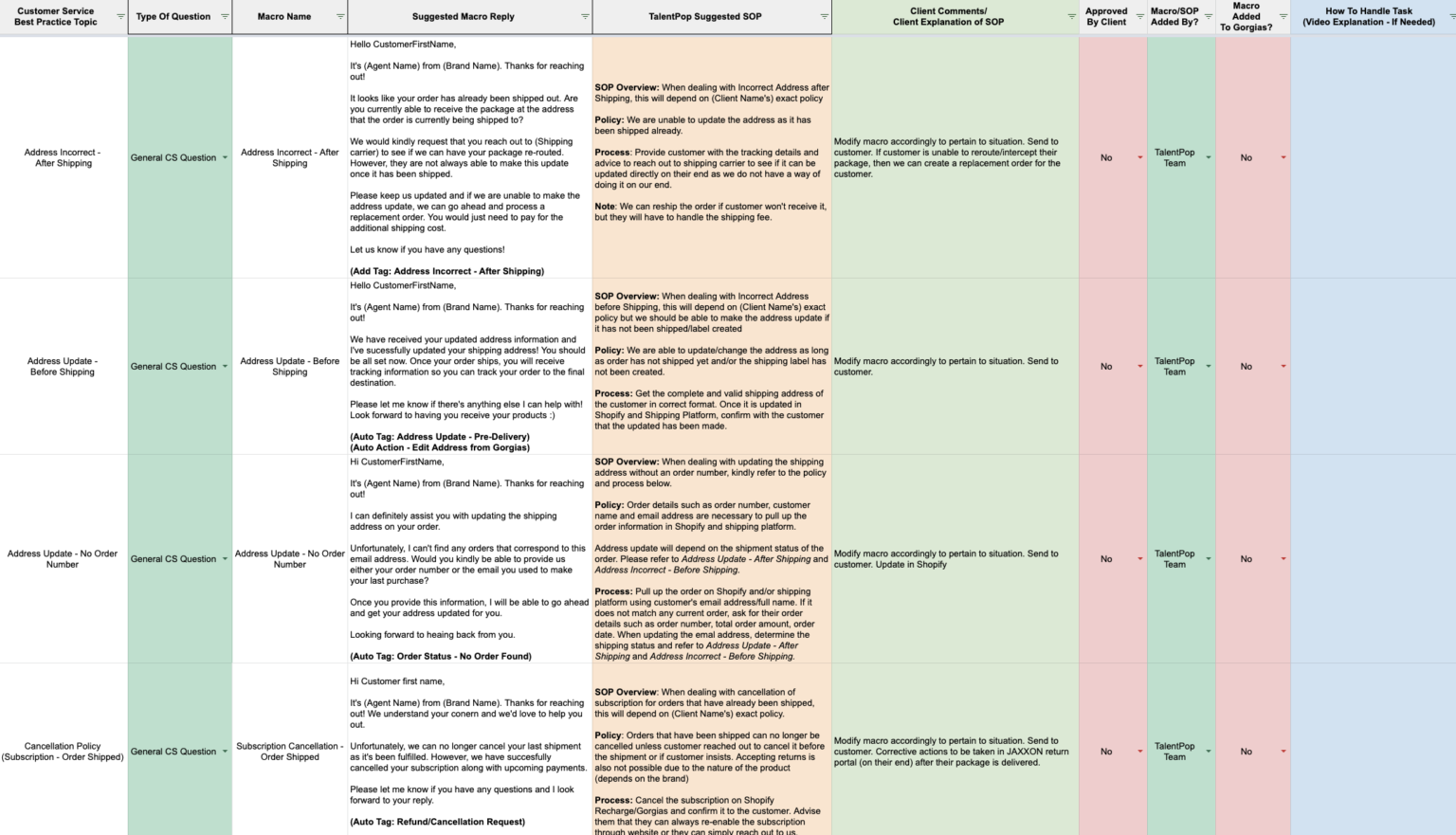
SOPs not only decrease response and resolution times for tickets, but they also create consistency around how inquiries are handled by your team.
How to Adapt This Template Into a Helpdesk SOP
A helpdesk SOP uses the same structure, but it focuses on how tickets move through your system rather than how one request gets resolved. Add these fields when you adapt the template:
Customer Service SOP Examples for E-Commerce Teams
The five SOP examples below cover the tickets that fill most E-Commerce queues. Use them as outlines, then replace the policy details with your own.
SOP Example 1: Where Is My Order (WISMO)
Order status questions are often the largest ticket category, so a tight SOP here saves the most time.
SOP Example 2: Returns and Exchanges
Returns SOPs get tested when your tools change. When apparel brand Jolyn moved to a new 3PL and returns platform, three agents managed the transition without any service disruption because the process was clearly defined.
SOP Example 3: Refund and Discount Requests
Refunds and discounts are where inconsistency costs real money. Without documented processes for exchange requests and discount policies, tickets get handled differently depending on who answers, and customers notice.
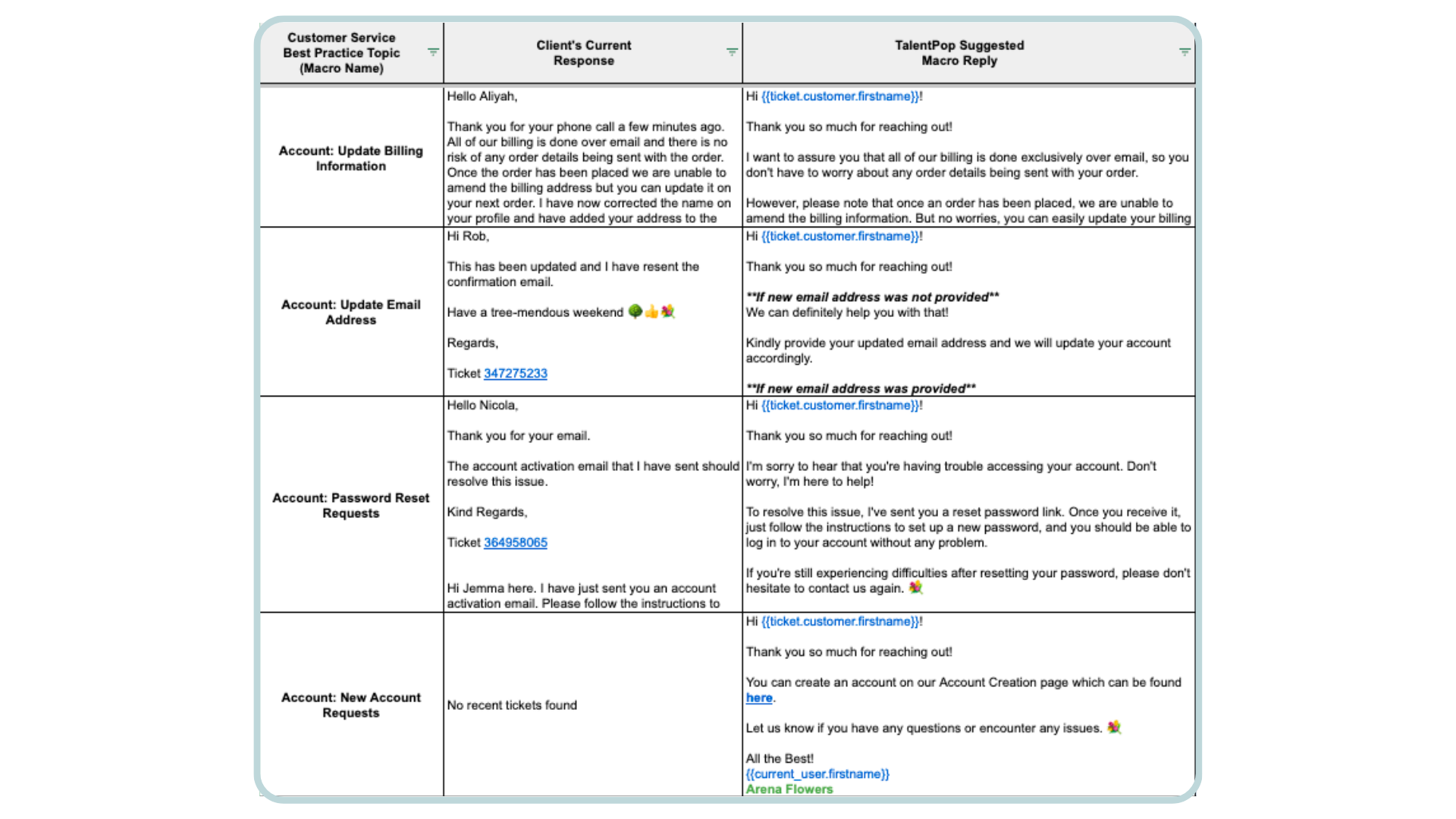
This is the first thing our team fixes for the 750+ brands we work with. We download each brand's past tickets, review every resolution, and build a macro file that pairs each common question with a suggested reply and the SOP behind it. Depending on the brand, that macro file lives in a spreadsheet or is built out directly in Poppi, our in-house AI copilot, and it becomes the single source of truth for every agent on the account.
Core Metrics: Expanded customer support channels and generated $100K during BFCM, with onboarding built on organized Excel macro files plus tagging systems and rules set up in Gorgias.
"Because TalentPop and Gorgias work closely as partners, it was good for us to switch to TalentPop. Plus, you guys made the whole onboarding process so organized, from super easy-to-use Excel files, the tagging systems and rules set up in Gorgias, it felt like the right move overall."
Jarett Castillo, Chief Experience Officer, JAXXONA spreadsheet like the one above remains a solid way to run your macro file, especially for smaller teams or brands that want to stay tool-agnostic. If you later want agents to get proposed replies automatically, the same rows can be loaded into Poppi without rewriting anything.
SOP Example 4: Subscription Cancellation Save
For subscription brands, a cancellation request is also a retention opportunity. Your SOP should give agents a structured way to understand the reason and offer an alternative before processing the cancellation.
This SOP matters most for food and subscription brands, where every saved subscriber is recurring revenue.
Core Metrics: Retention rate increased by 5% through proactive subscription cancellation deflection.
"Switching to TalentPop, we saved so much money AND our results have improved so dramatically!"
Kate Dalton, DirectorSOP Example 5: Escalating an Upset Customer or Chargeback Threat
Helpdesk SOP: Turning Procedures Into Helpdesk Workflows
A helpdesk SOP only works if agents can find it in the middle of a ticket. The best teams build their procedures directly into the tools they already use.
Mapping SOPs to Tags, Rules, and Macros in Gorgias or Zendesk
Agents who already know your helpdesk ramp up faster when SOPs are waiting for them. Every growing brand feels this during launches and peak seasons, whether it sells apparel, home goods, or beauty and wellness products, because new agents need to handle tickets well from day one.
Using Customer Service SOPs With an AI Copilot
AI tools are only as good as the procedures behind them. If your SOPs are vague or outdated, an AI assistant will simply repeat vague, outdated answers faster. The same Salesforce research found that 80% of customers say it is important for a human to validate AI output, which is why SOPs that keep agents in control matter.
Here is what that looks like in practice with Poppi, an AI copilot that runs inside your helpdesk. It connects your SOPs to every reply in three steps:
Agents can also ask Poppi direct questions, like "What is our return policy?", and get an answer drawn from the team's SOP with the source cited, along with the matching return and refund macros. Replies can be translated into more than 30 languages without leaving the ticket.

One copilot, three parts: Poppi runs as a Chrome extension over the tools your team already uses, including Gorgias, Zendesk, Kustomer, Richpanel, and Shopify, and goes live in minutes with no migration.
Poppi is built by TalentPop and reports a 30%+ increase in agent productivity. It is included free for every agent a brand brings on through TalentPop, and other teams can start with a 30-day free trial.
Clean SOPs also make helpdesk automation possible for simple, repetitive tickets. That frees your agents to focus on the conversations that need a human.
Core Metrics: Automated one-fourth of customer service tickets with Gorgias AI to boost efficiency and scale support.
"Working with TalentPop to set up Gorgias [AI] has been an exceptional experience. Their expertise and support made the integration process smooth and efficient, significantly enhancing our team's productivity and overall performance. We couldn't be happier with the results!"
Michelle Tedder, Customer Service ManagerCommon Customer Service SOP Mistakes to Avoid
How to Keep SOPs Current as Your Team Scales
SOPs are living documents. Every new product, policy, carrier, or helpdesk change should trigger an update.
AI can shorten this loop. Poppi flags topics from live conversations that are missing from your knowledge base and drafts new articles for your approval. It also builds knowledge checks when a policy launches, so agents are tested on the new process right away.
Strong SOPs also make fast growth possible, especially in regulated categories. When you add outsourced support agents to extend coverage, documented procedures keep quality steady as the team grows.
Twentyeight Health, a women's telehealth brand, is a good example. Our team built out all of its SOPs with step-by-step processes, plus a brand-specific guide covering top questions, answers, tone of voice, and HIPAA-compliant handling of personal health information. Those documents let support expand from weekday business hours to 7 AM to 11 PM, 7 days a week, with the same standard of care whether or not a manager was online.
Core Metrics: Scaled from 2 to 10 agents and expanded coverage 2.4x, from 9 AM to 5 PM on weekdays to 7 AM to 11 PM, 7 days a week, following HIPAA-compliant SOPs under a formal business associate agreement.
"The individuals that we have brought on are complete rock stars."
Elisabeth Tomaselli, CX, Product and Ops ManagerWe do more than place agents. Our team builds out your SOPs, macros, and helpdesk setup (tags, rules, and workflows) from your historical tickets, then trains agents to work from them on day one, with our AI copilot included free for every agent you bring on.
Frequently Asked Questions About Customer Service SOPs
What is a customer service SOP?
A customer service SOP is a written, step-by-step procedure for handling one type of customer request, such as a return or a refund. It keeps answers consistent no matter which agent picks up the ticket.
How do you write an SOP step by step?
Export your past tickets, group them by reason, and pick your top five ticket types. Map the current workflow with your agents, write verb-first steps with if/then rules, attach macros and escalation paths, then test the SOP with a new agent before you publish it.
What should a customer service SOP template include?
A strong template includes a title and ID, purpose, scope and trigger, owner, tools, procedure steps, decision points, linked macros, an escalation path, performance targets, and version history.
What is the difference between an SOP and a policy?
A policy states the rule, such as a 30-day return window. An SOP explains how an agent applies that rule step by step, including what to do with exceptions.
What is a helpdesk SOP?
A helpdesk SOP documents how tickets move through your support system: intake, triage, tagging, prioritization, assignment, escalation, and closure. It sits above the SOPs for individual request types.
How many SOPs does a support team need?
Start with five that cover your highest-volume and highest-risk ticket types. Add more as new products, channels, and policies launch.
How often should customer service SOPs be updated?
Update an SOP as soon as the process it describes changes. Beyond that, review high-volume SOPs quarterly and every other SOP at least once a year.
Can AI help write or follow customer service SOPs?
Yes. AI copilots such as Poppi can pull answers from your SOPs mid-ticket, suggest matching macros, and flag gaps in your documentation. Human agents should still review AI-drafted replies before they reach customers.
Building Customer Service SOPs That Last
A customer service SOP turns the way your best agent handles a ticket into the way every agent handles it. Start with your ticket history, document your five most common requests, and write steps clear enough for a new hire to follow on day one. When each SOP has an owner, a review date, and a clear link to the macros and tools your team already uses, consistency becomes the default rather than the exception.

Need Help With Customer Service?
Book a call with one of our specialists today to see how TalentPop can assist you with putting together a solution for your customer service needs.
Book a CallNeed Help With Customer Service?
We're elevating customer experiences at 500 top E-Commerce brands (and counting). Let's see what we can do for you!
Get Started


