


A well-built E-Commerce FAQ page answers shopper questions before they turn into support tickets. Shoppers already look for that help: a survey of 5,728 customers by Gartner found that 73% use self-service at some point in their support journey. The same research found that only 14% of issues are fully resolved there, and that the most common reason for failure was not finding relevant content (43% of cases).
That gap is your opportunity. A clear FAQ for your E-Commerce website closes it by putting the right answer in front of the right shopper at the right moment.
This guide covers what to include, how to build the page, and which brands do it well. You will also get copy-ready answers you can adapt today.
What Is an E-Commerce FAQ Page?
An E-Commerce FAQ page lists the questions shoppers ask most often, paired with short, direct answers. It covers orders, shipping, returns, payments, products, and support. Think of it as a self-service front desk for your store.
FAQ stands for frequently asked questions. Many brands also use the page for policies and brand basics that do not fit anywhere else. You may hear it called a FAQ for an online store, an online shopping FAQ, or a help page, but the goal stays the same: answer fast.
Where to Place Your FAQ So Shoppers Find It
Link the page in your header or footer navigation. Then add links at high-friction moments, such as the cart, the checkout, and product pages. A product-level FAQ catches questions right when a shopper hesitates.
A page that nobody can find helps nobody. If shoppers must hunt for the link, they will open a ticket instead.
FAQ Page vs. Help Center vs. Knowledge Base
An FAQ page holds your top 10 to 20 questions with short answers. A help center or knowledge base adds search, categories, and long-form guides. Start with the FAQ, then grow into a knowledge base when your ticket volume demands it.
Benefits of an E-Commerce FAQ Page
Built well, an FAQ page pays off in support, sales, and search. Here are the main gains.
Fewer Repetitive Support Tickets
Shoppers who find answers on their own never open a ticket. Review your ticket data each month to see which repeat questions to add next. That frees your agents for issues that truly need a human.
More Trust and Higher Conversions
Shoppers buy when they feel sure. Clear answers on shipping costs, delivery times, and returns remove doubt right before checkout. Going beyond the basics, such as product care or sizing detail, also positions your brand as the expert.
Better SEO and Featured Snippet Potential
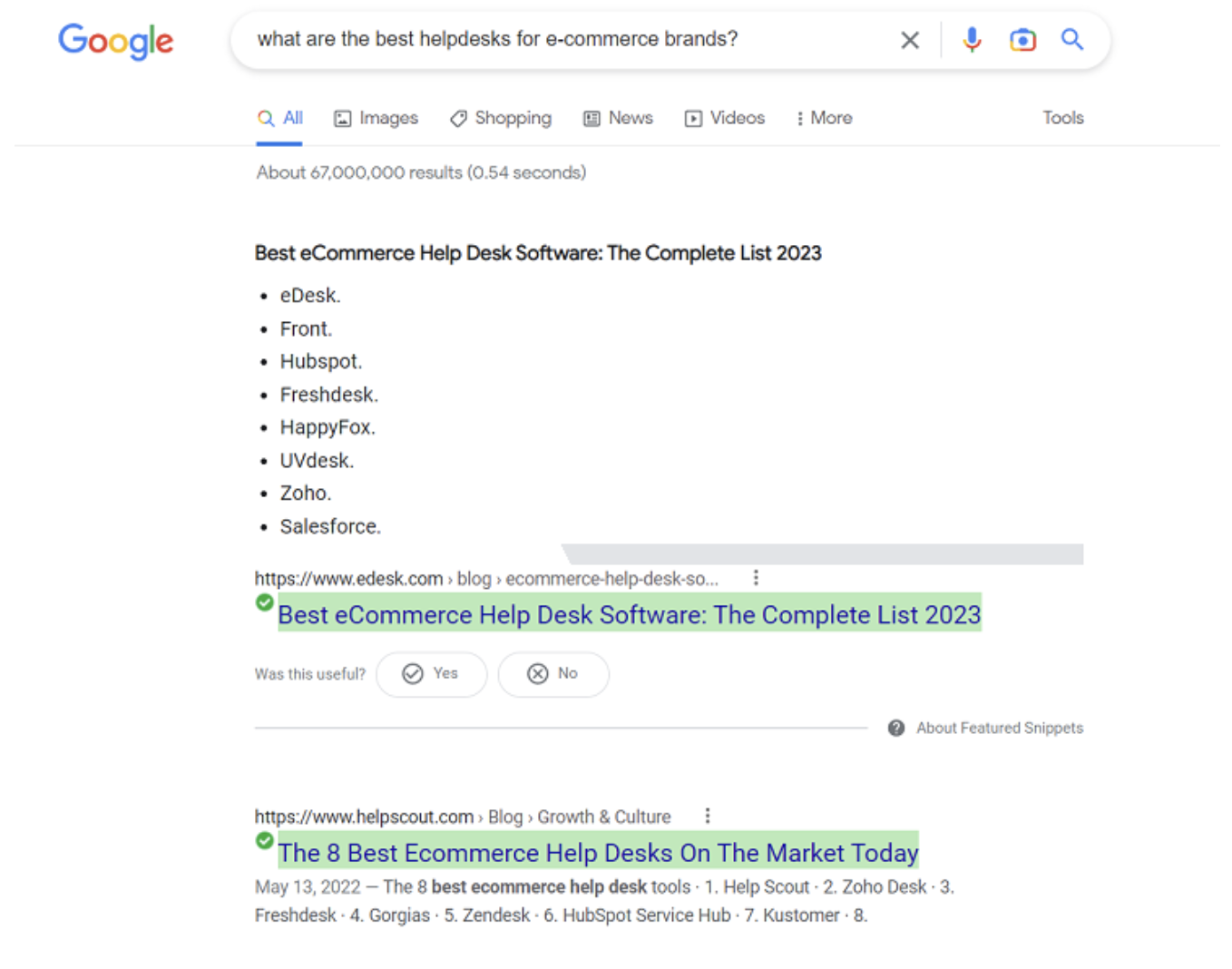
Question-style headings match how people search. A well-structured FAQ can earn featured snippets, which are the short answers Google shows at the top of results. Write each answer in 40 to 60 words and use the question itself as the heading.
Internal links from your FAQ to category and policy pages also spread authority across your site.
Common FAQ Questions for E-Commerce Websites
Start with the basics. These common FAQ questions for E-Commerce websites appear on nearly every successful store, and they cover most of the tickets you would otherwise handle by hand. Group them into categories so shoppers can scan quickly.
Ordering and Payment Questions
Shipping and Delivery Questions
Returns, Exchanges, and Refunds Questions
Product and Sizing Questions
Account, Privacy, and Security Questions
Promotions, Discounts, and Gift Card Questions
Contact and Support Questions
Use the grid below as a quick planning tool. It shows which categories to prioritize and why shoppers ask about them.
| Category | Priority Questions | Why Shoppers Ask |
|---|---|---|
| Shipping | Delivery time, shipping cost, tracking, international options | Shoppers weigh cost and speed before they commit to buy |
| Returns | Return window, how to start a return, refund timing | A clear policy lowers the perceived risk of buying online |
| Payment | Accepted methods, security, payment plans | Shoppers want to know they can pay their preferred way, safely |
| Product | Sizing, materials, restocks, warranty | Shoppers cannot touch the item, so they need detail |
| Support | Contact options, hours, live chat, missing packages | Shoppers need a fast path to a human when the FAQ falls short |
E-Commerce FAQ Questions and Answers You Can Copy
Questions are only half the job. Below are E-Commerce FAQ questions and answers you can adapt for your own store. Replace the bracketed details with your real policies, and keep each answer near 40 to 60 words.
Sample Answers for High-Volume Questions
How long will my order take to arrive?
Orders ship within [1 to 2] business days. Standard delivery takes [3 to 5] business days after that, and express delivery takes [1 to 2]. You will receive a tracking link by email as soon as your order ships.
What is your return policy?
You can return unused items within [30] days of delivery for a full refund. Start your return from your account or contact our team. We refund your original payment method within [5 to 7] business days after we receive the item.
How can I track my order?
Use the tracking link in your shipping confirmation email, or log in and open your order history. Tracking updates can take up to [24 hours] to appear after your order ships.
Do you offer international shipping?
Yes, we ship to [list of countries]. Delivery usually takes [7 to 14] business days. Duties and taxes [are or are not] included at checkout, and you can see the exact rate in your cart before you pay.
What payment methods do you accept?
We accept [list of cards and wallets]. Payments are processed through [payment provider] using encryption. If a payment fails, contact our team and we will help you finish your order.
Can I change or cancel my order?
You can change or cancel your order within [X hours] of placing it. Contact our team with your order number right away. After that window, your order may already be in fulfillment, and you can return it instead.
What if my order arrives damaged or incorrect?
We are sorry about that. Send a photo and your order number to [support email] within [X days] of delivery, and we will send a replacement or refund at no cost to you.
How do I contact customer support?
Reach us by live chat, email at [email address], or phone at [phone number]. Our team is available [days and hours], and we reply to emails within [X hours].
How to Create an E-Commerce FAQ Page in 6 Steps
Follow this process to build a page shoppers actually use. Each step builds on the one before it.
Mine real questions from your support data
Start with your ticket history, live chat logs, and product reviews. Tag the most common topics and rank them by volume. Search data and social comments can add questions you do not hear directly.
Write direct, scannable answers
Lead with the answer, then add detail. Long or convoluted answers confuse shoppers and weaken your shot at a featured snippet. Use the words customers use, and always include the basic FAQ questions for E-Commerce, even when they seem obvious to you.
Organize into categories and prioritize the top questions
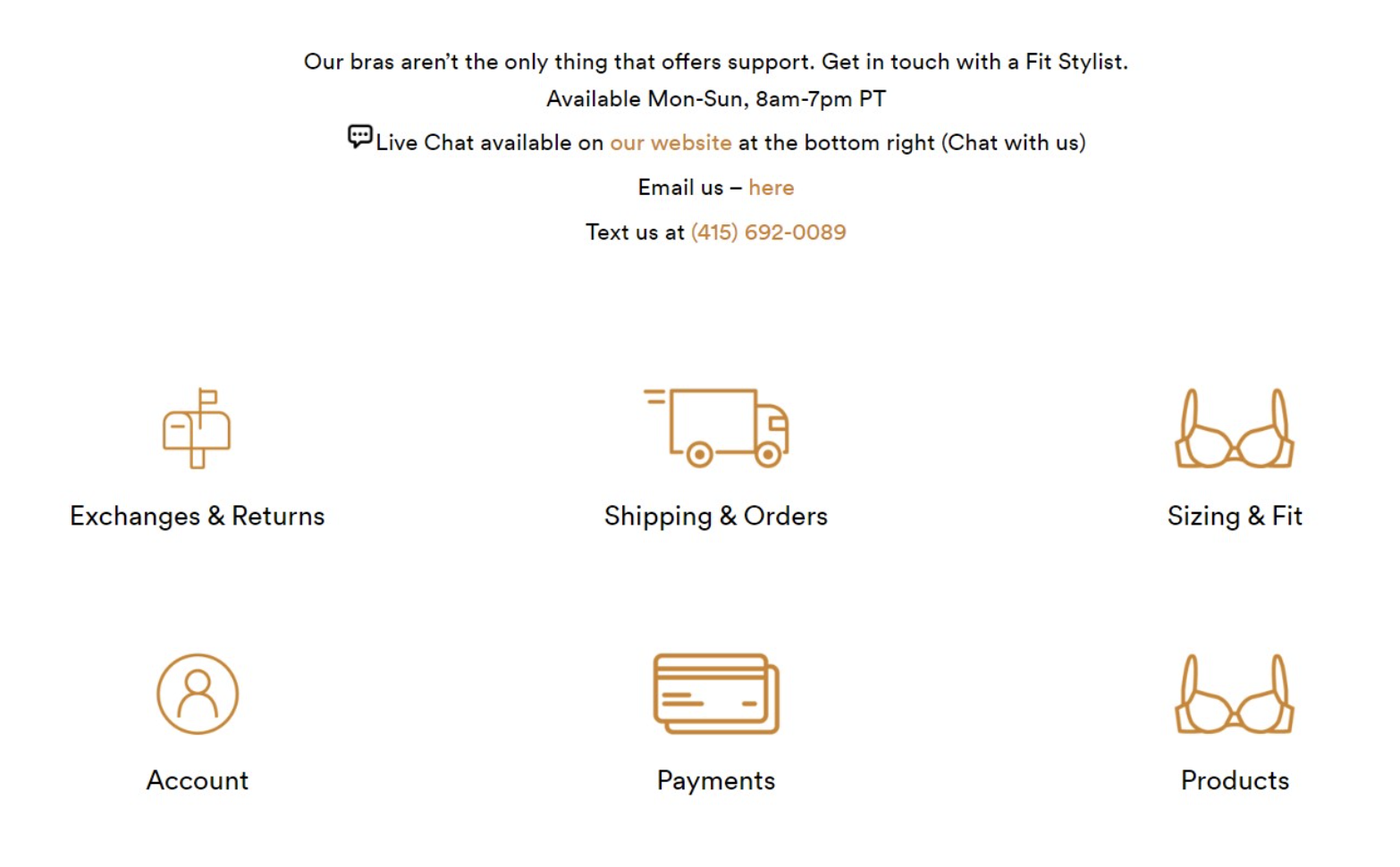
Group questions into clear categories and put the highest-volume topics first. ThirdLove uses icon-based categories for exchanges and returns, shipping and orders, sizing and fit, account, payments, and products. Shoppers can jump straight to the right topic.
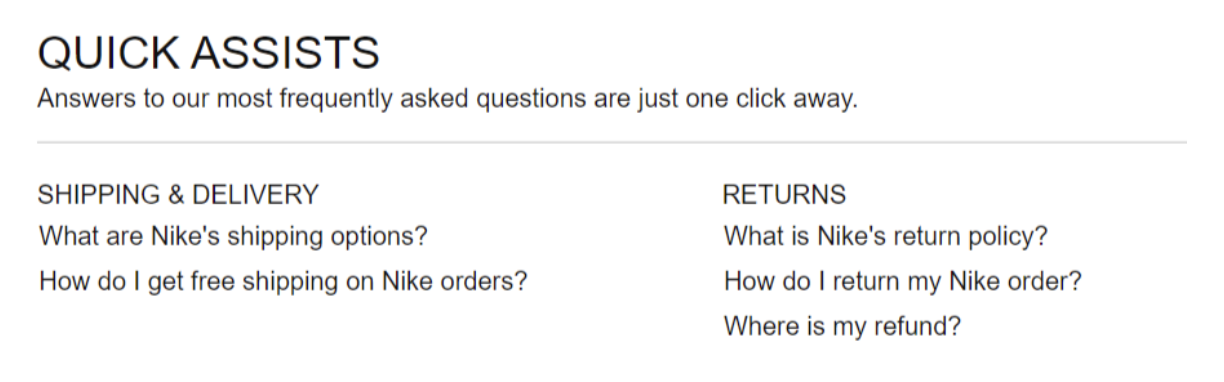
Nike takes a similar approach with a "Quick Assists" block near the top of its page. Shipping and returns questions sit up front because those are the topics most shoppers need.
Add contact options and a live chat handoff
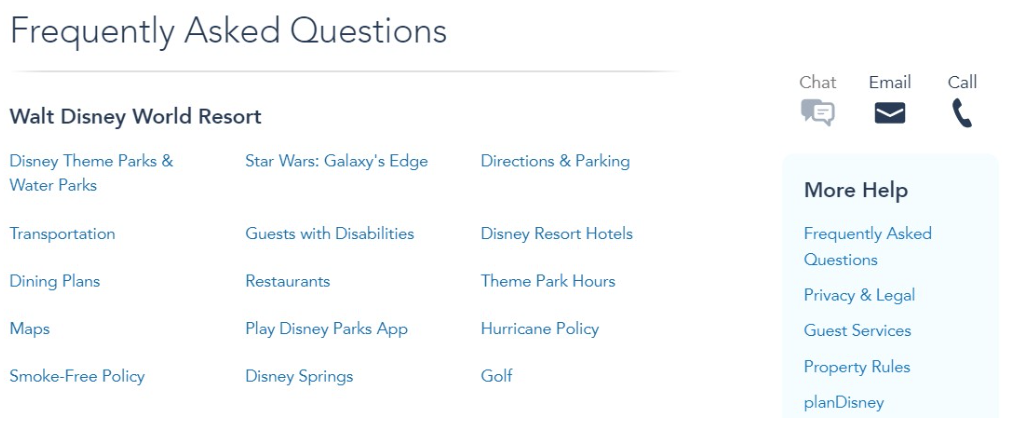
Every shopper has hit the wall of an FAQ that did not answer their question. Prevent that dead end by listing your contact options plainly. Walt Disney World puts chat, email, and phone options at the top of its FAQ page, right beside the topic list.
Live chat works even harder when agents can also answer pre-sale questions. Staffing it with live chat sales support turns FAQ visitors into buyers instead of bounces.
Add internal links and FAQ schema
Link each answer to the page that holds the full detail, such as your shipping policy, returns page, size guides, and product categories. Internal links help shoppers and spread authority across your site.
FAQPage structured data can also label your content for search engines. Keep expectations realistic, though: after Google's 2023 update, FAQ rich results appear mainly for well-known government and health sites. Treat the markup as good housekeeping, not a ranking lever.
Review and update every month
An outdated FAQ erodes trust fast. Review the page monthly, add new questions from your tickets, and retire answers that no longer apply. Launching a new product? Add its questions the same week.
E-Commerce FAQ Examples to Learn From
Studying strong E-Commerce FAQ examples speeds up your own build. You already saw ThirdLove, Nike, and Walt Disney World above. These brands add more ideas worth borrowing.
Common E-Commerce FAQ Mistakes to Avoid
Even a well-intentioned page can miss the mark. Watch for these common errors.
How Support Data Keeps Your FAQ Accurate
The best FAQ pages evolve with your tickets. Your support team sees new questions first, so a strong support operation feeds your FAQ. Two things keep that loop tight: dedicated support agents who tag repeat questions, and AI-powered ticket deflection that handles simple ones automatically.
This loop matters most for E-Commerce brands, where order status and returns dominate the queue. It also helps retail teams managing seasonal spikes and beauty and wellness stores fielding product-usage questions.
Turn your support data into a better FAQ. The right team and tools help you spot repeat questions, cut ticket volume, and keep every answer current.
Frequently Asked Questions About E-Commerce FAQ Pages
What should an E-Commerce FAQ page include?
Cover orders, payments, shipping, returns, products, account security, promotions, and contact options. Add answers in plain language and link to full policies for detail. Start with the questions your support team answers most often.
How many questions should an E-Commerce FAQ have?
Start with the top 10 to 20 questions. Feature the five to seven most important ones at the top of the page. Add search and categories as the list grows.
What are the most common FAQ questions for an online store?
Shoppers ask about delivery time and cost, order tracking, the return policy, accepted payment methods, sizing, and how to reach support. These basic FAQ questions for E-Commerce belong on every store.
Where should I put my FAQ on an E-Commerce website?
Link it in your header or footer, then add links in the cart, at checkout, and on product pages. Placing answers near the point of doubt reduces abandoned purchases and tickets.
How often should I update my E-Commerce FAQ?
Review it at least once a month. Update it right away whenever shipping times, policies, or products change.
Should I add FAQ schema markup?
You can, and it does no harm. Google now shows FAQ rich results mainly for well-known government and health sites, so do not expect a visible boost. The bigger SEO win comes from clear, well-structured answers.
Conclusion: Build an E-Commerce FAQ That Earns Its Place
A strong E-Commerce FAQ does more than list policies. It answers real shopper questions in plain language, points to the next step, and stays current as your store grows. Start with your support data, write short direct answers, and organize them so people find what they need in seconds. Review the page each month, and it will keep saving your team time while helping more shoppers feel confident about buying.

Need Help With Customer Service?
Book a call with one of our specialists today to see how TalentPop can assist you with putting together a solution for your customer service needs.
Book a CallNeed Help With Customer Service?
We're elevating customer experiences at 500 top E-Commerce brands (and counting). Let's see what we can do for you!
Get Started


