A clear out of stock message can decide whether a shopper waits for you or buys somewhere else. In a recent survey of 1,000 U.S. consumers, 62% had already switched brands because of a stockout, 82% would try a competitor if their go-to product is often unavailable, and 25% said stockouts hurt their trust in a brand. Those numbers show that your wording matters almost as much as the restock itself.
This guide gives you 21 copy-and-paste templates for product pages, orders already placed, back-in-stock alerts, SMS, live chat, social DMs, and phone calls. You will also find 10 subject lines, a chooser table, and the mistakes that cost brands repeat customers.
What Is an Out of Stock Message (and Why Wording Matters)
An out of stock message is any notice that tells a customer a product is unavailable. It can appear on a product page, in a cart, in an email, or in a support chat. The goal stays the same: share honest facts, offer a next step, and protect the customer's trust.
Shoppers tend to accept a stockout when a brand is upfront about it. They get upset when they learn late, get vague answers, or have no way to fix the problem. Fast, specific wording turns a disappointing moment into proof that you care.
Where Customers See Out of Stock Messages
Customers run into these messages at five points, and each point needs different wording. A browser wants an alert option, while a buyer who already paid wants a refund date. Strong E-Commerce customer support covers all five.
Out of Stock Message vs. Back-in-Stock Alert
An out of stock message says an item is unavailable now. A back-in-stock alert says the wait is over. Treat them as a pair: the first collects an email address or phone number, and the second uses it to close the sale.
Out of Stock Message Examples for Product Pages and Checkout (Templates 1 to 5)
Prevention comes first. These out of stock message examples work on the page, before a customer pays for something you cannot ship. Pair them with accurate inventory sync so the page updates the moment stock hits zero.
Sold-Out Button and Product Page Copy
Replace the Add to Cart button with a clear sold-out label, and place the next step right beside it. The example below shows a sold-out size with a waitlist link next to the size selector.
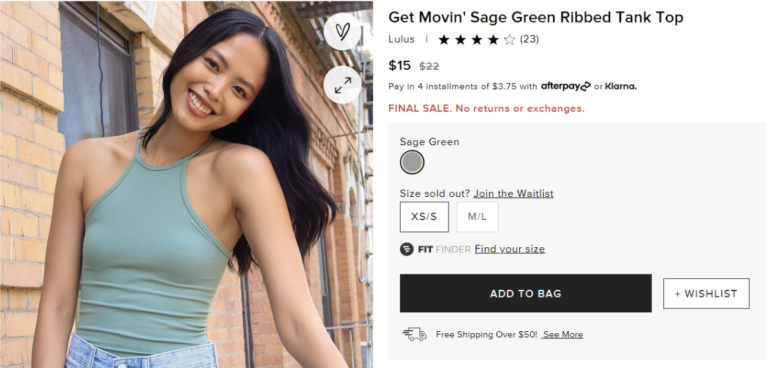
Button label: Sold Out, Notify Me
Message: This style is sold out in your size. Join the waitlist and we will email you the moment it is back.
"Notify Me" and Waitlist Prompts
A signup form turns a lost visit into a lead. Ask for the size or color and an email address, and nothing more.
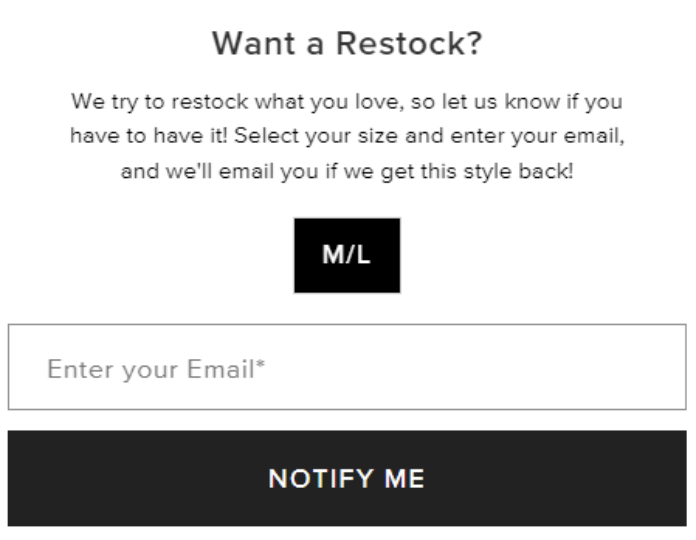
Want a restock?
Select your size and add your email. We will let you know the second it is back in stock.
Button label: Notify Me
Low Stock Messages
Low stock notices create honest urgency. Use them only when the count is real and keep the number accurate. Fresh and seasonal items sell out fast, which is why food and delivery brands lean on these notices to cut down on "is this still available?" tickets.
Only [number] left in [size or color]. Order soon, because we may not restock this item.
Pre-Order and Backorder Messages
Skip the words "sold out" when you can still take orders. Say exactly when the item ships, because a vague "coming soon" erodes trust.
Pre-order now, ships by [date]. [Your card is charged today / Your card is charged when your order ships.] You can cancel any time before it ships.
Cart and Checkout Notices
If an item sells out while it sits in the cart, tell the shopper before payment. This one notice prevents refund emails and support tickets later. Retail customer service teams see this most often during promotions and holiday sales.
One item in your cart just sold out: [product name]. We saved the rest of your order. Choose a similar item below or remove it to check out.
Out of Stock Email Templates for Orders Already Placed (Templates 6 to 12)
Sometimes an order slips through. The out of stock email you send next needs to arrive fast, apologize briefly, and offer clear options. Every template below follows that pattern, so you can swap in your own brand voice.
Send the message the same day you spot the problem. Each template includes a subject line you can use as written.
Item Out of Stock With a Known Restock Date
Use this out of stock email template when you know when stock returns. It lets the customer choose between waiting and leaving.
Subject: An update on your order [order number]
Hi [First Name],
Thank you for your order. The [product name] you chose is out of stock for now, and we are sorry for the wait. We expect it back on [date].
We will ship your order the day it arrives, using the shipping method you picked. If you would rather not wait, reply to this email and we will send a full refund or suggest a similar item.
Thank you for your patience,
[Brand name]
Item Out of Stock With No Restock Date
When you cannot promise a date, do not guess. Refund quickly and point the customer to items you can ship now.
Subject: Your [product name] is out of stock, here are your options
Hi [First Name],
We are sorry to share that [product name] sold out faster than planned, and we do not have a restock date yet. We canceled that item and started a full refund to your original payment method. It should arrive within [number] business days.
If you would like something similar, these items are in stock now: [links]. Reply any time if you have questions.
[Brand name]
Discontinued Item With a Substitute
A close substitute can save the sale. Make the swap a one-word reply so the customer needs almost no effort.
Subject: A closer match for your [product name] order
Hi [First Name],
We no longer carry [product name], and we are sorry to disappoint you. The closest match is [substitute name] at [price or price difference].
Reply "swap" and we will send it in place of your original item. Reply "refund" and we will return your payment in full.
[Brand name]
One Item Out of Stock in a Multi-Item Order
Do not let the missing item hide the good news. Confirm what shipped, include tracking, and then explain the delayed item.
Subject: Part of your order shipped, one item is delayed
Hi [First Name],
Good news: [in-stock items] shipped today. Your tracking link is [link].
[Out-of-stock item] is out of stock right now. You can choose to have it shipped separately when it returns on [date], or we can refund that item today. Just reply with your choice.
[Brand name]
Shipping Delay With a Goodwill Discount
A small gesture helps when a delay runs longer than promised. Keep the discount modest so you can offer it again.
Subject: A small thank you for your patience
Hi [First Name],
Your [product name] is delayed until [new date], and we know that is frustrating. Your order is safe and will ship first when stock arrives.
As a thank you, take [number]% off your next order with code [CODE]. If you would prefer a refund, reply and we will handle it right away.
[Brand name]
Expedited Shipping Downgrade
If the customer paid for fast shipping on an item you cannot send, paid speed no longer helps them. Offer a switch and refund the difference.
Subject: Choose your shipping option
Hi [First Name],
Because [product name] is out of stock until [date], expedited shipping will not get it to you faster. Tell us within 24 hours if you want to switch to standard shipping, and we will refund the price difference.
If we do not hear from you, we will keep your current shipping method.
[Brand name]
Full Apology and Refund Confirmation
Close the loop once the refund is issued. This out of stock apology email confirms the amount, the timing, and an open door to return.
Subject: Your refund is on the way
Hi [First Name],
We issued a refund of [amount] for order [order number]. Your bank may take up to [number] business days to show it.
We are sorry we let you down on this one. If you decide to shop with us again, use code [CODE] for [number]% off.
[Brand name]
Back-in-Stock and Waitlist Email Templates (Templates 13 to 16)
The best out of stock email often arrives later, when the product returns. Back-in-stock emails have an easy job because the customer already asked for the item. Send them quickly, since popular items can sell out again.
Back-in-Stock Alert
Include everything a buyer needs to decide: the product name, price, and available sizes or colors.
Subject: [Product name] is back in stock
Hi [First Name],
You asked us to tell you when [product name] returned, and it is back in [sizes or colors] for [price]. Stock is limited, so shop soon: [button link].
[Brand name]
Early Access for Waitlist Subscribers
Reward people who signed up. Early access makes them feel valued and gives you a strong first-day sales spike.
Subject: You get first access to [product name]
Hi [First Name],
Because you joined the waitlist, you can shop [product name] [number] hours before everyone else. Your early access link is [link].
[Brand name]
Pre-Order Confirmation
Confirm the ship date and the cancellation terms right away. Clear terms cut down on "where is my order?" messages.
Subject: Your pre-order is confirmed
Hi [First Name],
Thank you for pre-ordering [product name]. We expect to ship it by [date] and will email your tracking link the day it leaves. You can cancel any time before then by replying to this message.
[Brand name]
Almost Sold Out Reminder
Send this to shoppers who viewed or saved the item. Use it only when the stock count is real.
Subject: Only a few [product name] left
Hi [First Name],
The [product name] you looked at is almost gone. We have [number] left, and we do not know when we will restock. Grab yours here: [link].
[Brand name]
Out of Stock Messages for SMS, Live Chat, and Social DMs (Templates 17 to 21)
Customers do not only write to your inbox. They text, chat, and send DMs, so your team needs short scripts for each channel. Keep the same three parts every time: the fact, the apology, and the choice.
SMS
Text messages must stay short, and you should send them only to customers who opted in. Give reply keywords so the customer can answer in one word.
[Brand name]: Sorry, [product name] is out of stock. We expect it back on [date]. Reply WAIT to keep your order, SWAP for a similar item, or REFUND to cancel.
Live Chat and Helpdesk Macro
Chat is also a sales moment. An agent who suggests a close alternative can save the sale, and a trained live chat sales support rep does this without sounding pushy.
Hi [Name], thanks for checking. [Product name] is out of stock right now, and we expect it back around [date]. I can add you to the restock list, or I can show you two similar options. Which would you prefer?
Save the next reply as a macro in your helpdesk so every agent answers the same way. If the same stockout ticket keeps returning, helpdesk automation can handle the simple replies.
Hi [First Name],
Thanks for reaching out about order [order number]. [Product name] is out of stock right now, and we are sorry for the trouble. We expect it back on [date].
You can wait and we will ship it first, switch to [alternative], or receive a full refund. Let us know which option you prefer and we will take care of it today.
[Agent name]
Instagram and Facebook DM
Keep the tone casual and the reply short. Offer to message the customer when the item returns so the conversation stays open.
Hey [Name]! Thanks for asking about [product name]. It is sold out for now, but we are restocking around [date]. Want us to DM you when it is live, or should I send a link to a similar one?
Phone Script
On a call, agents need a simple script that avoids awkward pauses. Lead with the fact, then move straight to the options.
Thanks for calling. I checked, and [product name] is out of stock at the moment. It should return around [date]. I can put your name on the list, check a similar item for you, or help with a refund. What would you like to do?
Out of Stock Email Subject Lines (10 Options)
A subject line decides whether the customer reads your apology. State the news plainly, skip clickbait, and add the order number when it helps.
How to Write an Out of Stock Message That Keeps Customers
Every strong message follows the same six habits. Use them to write your own version or to adjust any template above.
Send It Fast
Contact the customer the moment you spot the problem. Waiting only gives them time to wonder what happened.
Be Specific
Name the product, the size or color, and the order number. Replace "coming soon" with a real date, or say plainly that you do not have one yet.
Apologize Once
Own the mistake in a single sentence, then move on. Long apologies push the useful information down the page.
Give Clear Options
Offer no more than three choices: wait, swap, or refund. Tell the customer how to pick one, ideally with a single reply.
Add a Small Incentive
A discount code or free shipping on the next order can soften the letdown. Match the size of the perk to the order value, since a big offer on every message is hard to sustain.
Match Your Brand Voice
A playful brand can write playfully, and a formal brand should stay formal. Whichever you choose, keep the tone the same across email, chat, and social replies.
Which Out of Stock Message to Use
Use this table to pick the right template for the situation. Start with the scenario, then match the channel and timing.
| Scenario | Best Channel | Goal | Timing | Templates |
|---|---|---|---|---|
| Item sold out on the site | Product page | Capture an email | Before purchase | 1, 2 |
| Item almost sold out | Product page or email | Honest urgency | Before purchase | 3, 16 |
| Item can ship later | Product page or email | Keep the sale | Before or after purchase | 4, 15 |
| Item sells out in the cart | Cart or checkout | Prevent refunds | Before payment | 5 |
| Paid order, restock date known | Keep the order | Same day | 6 | |
| Paid order, no restock date | Refund and retain | Same day | 7, 12 | |
| Product discontinued | Swap or refund | Same day | 8 | |
| Part of an order delayed | Split the shipment | Same day | 9, 10, 11 | |
| Item returns to stock | Email or SMS | Recover the sale | As soon as stock lands | 13, 14 |
| Customer asks in real time | SMS, chat, DM, or phone | Answer and offer an alternative | During the conversation | 17 to 21 |
Common Out of Stock Message Mistakes
Even a well-meant message can backfire. Watch for these six problems.
How to Prevent Out-of-Stock Orders in the First Place
The best out of stock message is the one you never have to send. A few habits cut the number of oversold orders and the emails that follow.
Inventory Sync and Safety Stock
Connect your store, warehouse, and marketplaces so stock counts update in real time. Keep a small safety buffer on bestsellers, especially before sales events. A dedicated customer support team can also watch sync alerts and send messages the same day an issue appears.
Product Page Notices and Stock Alert Apps
Shopify offers apps for back-in-stock alerts, low stock counters, and countdown timers. These tools show the right notice on the product page and collect emails for your waitlist. Test each app on mobile before launch, since most shoppers browse on their phones.
Stockouts bring refund requests, order questions, and worried DMs at the worst moments. A trained E-Commerce support team can send these messages, handle the replies, and protect your reviews while you fix supply.
FAQ
What should an out of stock message say?
It should state which item is unavailable, apologize briefly, and give a restock date if you have one. Then offer clear next steps, such as waiting, swapping, or a refund.
How do you write an out of stock email?
Start with a plain subject line, name the product and order number, and explain the situation in two or three sentences. Close with options and a way to reply. The templates above follow this pattern.
How quickly should you send an out of stock email?
Send it the same day you find the problem. The sooner customers know, the more time they have to choose a refund or a substitute.
Should you offer a discount in an out of stock email?
A small discount or free shipping can help when the customer waited or paid in advance. It is not needed for every message, so match the offer to the order value and the length of the delay.
What is the difference between out of stock and backorder messaging?
Out of stock means you cannot fill the order and may not know when stock returns. Backorder means you accept the order now and ship when inventory arrives, so the message must include a ship date and cancellation terms.
How do you tell a customer over chat or SMS that an item is out of stock?
Keep it short. State the fact, give the expected date, and offer two options the customer can pick with a single reply. Templates 17 to 21 show wording for each channel.
Conclusion
Stockouts happen to every growing E-Commerce brand, but the way you word each out of stock message shapes what customers remember. Honest facts, a quick apology, and clear options keep trust intact while you fix supply. Choose the template that fits the moment, adjust the tone to your brand, and send it early.

Need Help With Customer Service?
Book a call with one of our specialists today to see how TalentPop can assist you with putting together a solution for your customer service needs.
Book a CallNeed Help With Customer Service?
We're elevating customer experiences at 500 top E-Commerce brands (and counting). Let's see what we can do for you!
Get Started